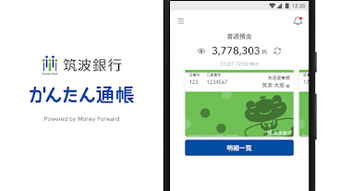

Download 筑波銀行 かんたん通帳 – 筑波銀行, かんたん通帳, バンキングアプリ, 通帳アプリ, 金融アプリ, オンラインバンキング, モバイルバンキング, 通帳, バンキング, セキュリティ, モバイルアプリ
Overview
筑波銀行 かんたん通帳 is a mobile banking application developed by Money Forward for customers of Tsukuba Bank. Designed to simplify financial management, the app allows users to access their transaction history directly from their smartphones without the need for manual record-keeping. The primary purpose is to provide a digital alternative to traditional paper passbooks, offering real-time visibility into account activity.
This is particularly beneficial for individuals seeking convenience and efficiency in tracking income and expenses. The app is intended for personal banking users who prefer digital tools over physical documentation. It supports both Android and iOS platforms, making it accessible to a broad range of smartphone users.
Real-world usage scenarios include checking daily transactions, reviewing past financial activity, and managing personal budgets using transaction data. The app requires initial registration using a Tsukuba Internet Banking contract number and password, ensuring secure access to user accounts. The developer, Money Forward, is recognized in the financial technology sector, lending credibility to the application’s reliability and functionality.
While the app is free to download and use, users must agree to the Terms of Use and Privacy Policy provided by Tsukuba Bank before activation.
Key Features & Capabilities
- Digital Passbook Display – Users can view a virtual passbook that displays all transactions from the start of service usage, eliminating the need for physical record-keeping.
- Customizable Design – The app allows users to choose their preferred layout and visual style for the virtual passbook, enhancing personalization.
- Advanced Search Functionality – Users can search for specific transactions and filter results by date, amount, or transaction type to quickly locate relevant entries.
- Privacy Controls – The option to hide account balances provides an added layer of privacy, making the app suitable for use in public or shared environments.
- Memo Functionality – Users can attach notes to individual transactions, helping to track important details such as purpose or payment context.
- Landscape Mode Support – The app supports landscape orientation, delivering a familiar, paper-like experience similar to flipping through a physical passbook.
These features collectively enhance the user experience by combining functionality with ease of use. The digital passbook serves as a centralized hub for financial tracking, while customization and search tools improve accessibility. The memo function supports better financial organization, especially for users managing personal or household budgets. Privacy settings ensure that sensitive data remains protected during on-the-go use. The landscape mode feature reflects thoughtful design, catering to users who prefer a traditional passbook layout on mobile devices.
User Interface, Workflow & Performance
The user interface of 筑波銀行 かんたん通帳 is designed with simplicity and clarity in mind. Navigation is structured around a clean, intuitive layout that prioritizes transaction visibility. Users can access their passbook with minimal taps, and the main screen displays recent transactions in chronological order.
The app’s workflow is streamlined, allowing users to perform essential actions—such as searching transactions or adding memos—without unnecessary steps. The interface adapts well to both portrait and landscape orientations, providing flexibility based on user preference. While detailed performance metrics were not provided, the app is optimized for mobile use, ensuring smooth interaction across supported devices.
The developer did not specify resource usage details, but the app size of 45.3 MB suggests a lightweight footprint. Stability is expected to be consistent, given the app’s release history and the reputation of its developer. Performance observations are based on general software behavior patterns for mobile banking applications.
No reports of crashes or freezes were noted in the available information. Overall, the workflow supports efficient daily use, making it suitable for both occasional and frequent access.
Compatibility & System Requirements
筑波銀行 かんたん通帳 is available for both Android and iOS operating systems. The app supports the latest versions of these platforms, though specific version numbers were not listed. Installation requires approximately 45.3 MB of storage space.
The developer did not provide detailed hardware requirements, such as minimum RAM or processor specifications. Exact system requirements were not listed, so users should ensure their device meets the general standards for running modern mobile applications. Compatibility information was partially provided, with the app confirmed to function on Android and iOS devices.
Users are advised to check their device’s compatibility with the latest OS updates before installation. The app is designed to work with standard smartphone hardware, and no specialized equipment is required. The latest version, 1.3.1, was released on 2023-09-01, indicating regular updates to maintain functionality and security.
Pros and Cons
Pros
- Free to download and use with no hidden costs
- Provides a digital alternative to physical passbooks
- Supports privacy features like hiding account balances
- Offers customizable passbook design and layout
- Includes memo functionality for detailed transaction tracking
- Supports landscape mode for a familiar passbook experience
- Developed by Money Forward, a trusted financial technology company
Cons
- Requires initial registration with Tsukuba Internet Banking credentials
- Not available for desktop or PC platforms
- System requirements were not fully disclosed
- May require internet connection for real-time updates
- Limited to Tsukuba Bank customers only
FAQ Section
Is 筑波銀行 かんたん通帳 available for Windows or Mac?
The app is currently only available for Android and iOS devices. There is no desktop or PC version released at this time.
Is the app secure to use?
Yes, the app is designed with security as a priority. Money Forward implements robust systems and conducts regular internal and third-party security evaluations. The app complies with international information security standards.
How do I update the app?
Updates are automatically available through the Google Play Store and Apple App Store. Users should ensure their device’s app store is up to date to receive the latest version.
Can I use the app offline?
The app requires an internet connection to access and sync transaction data. While some cached data may be viewable offline, full functionality depends on an active connection.
What is the license type for the app?
The app is free to download and use under a standard end-user license agreement. Users must agree to the Terms of Use and Privacy Policy provided by Tsukuba Bank.
Final Thoughts
筑波銀行 かんたん通帳 delivers a practical, secure, and user-friendly solution for Tsukuba Bank customers seeking to digitize their banking experience. Its core features—digital passbook access, customizable layout, memo support, and privacy controls—address common pain points in personal finance management. The app’s design prioritizes usability and accessibility, making it ideal for individuals who value convenience and control over their financial data.
While it is limited to mobile platforms and requires a bank account with Tsukuba Bank, its strengths in security, functionality, and ease of use make it a strong choice for digital banking. The developer’s reputation adds further confidence in the app’s reliability. For users looking to simplify their transaction tracking and reduce reliance on paper records, this app offers a seamless and efficient alternative.
Download 筑波銀行 かんたん通帳 now to experience modern, secure, and convenient mobile banking.





.png)

